
kubernetes的网络方案与其本身是解耦的,只要遵循CNI标准,可以使用不同厂家的网络方案,目前用的比较普遍的是flannel和calico,其中又各自根据技术的不同细分了overlay和路由方案,比如
kubernetes的网络方案与其本身是解耦的,只要遵循CNI标准,可以使用不同厂家的网络方案,目前用的比较普遍的是flannel和calico,其中又各自根据技术的不同细分了overlay和路由方案,比如flannel的vxlan和host-gw方案,calico的ipip和bgp方案,现在介绍一下calico方案的安装部署,及期间踩的一些坑,另外附上一些数据对比。
kubernetes的安装详见:步步为营实践总结kubernetes1.8.2安装配置部署
kubernets安装好后,开始安装网络方案,本次安装的是calico2.6.6,用的是yaml编排的方式安装,使用calico的ipip模式,证书直接使用etcd的证书,提前放在
$ ll /calico-secrets/
ca.pem        etcd-key.pem  etcd.pem
一、下载calico并做初步安装配置
$  wget https://github.com/projectcalico/calico/releases/download/v2.6.6/release-v2.6.6.tgz
$  tar -xf release-v2.6.6.tgz
$  cd release-v2.6.6
$  mv bin/calicoctl  /usr/local/bin
$  vim /etc/calico/calicoctl.cfg   #这是其中一个坑,没有配置文件calicoctl是无法使用的
apiVersion: v1
kind: calicoApiConfig
metadata:
spec:
  datastoreType: "etcdv2"
  etcdEndpoints: "https://10.211.103.167:2379,https://10.211.103.168:2379,https://10.211.103.169:2379"
  etcdKeyFile: "/calico-secrets/etcd-key.pem"
  etcdCertFile: "/calico-secrets/etcd.pem"
  etcdCACertFile: "/calico-secrets/ca.pem"
二、更改并载入yaml文件并配置k8s
简单的说下安装方式,每台node节点上会启动calico/node的pod,然后通过calico/cni容器的/install-cni.sh脚本来安装cni,yaml文件及操作如下:
$  cd release-v2.6.6
$  vim hosted/calico.yaml
# Calico Version v2.6.6
# https://docs.projectcalico.org/v2.6/releases#v2.6.6
# This manifest includes the following component versions:
#   calico/node:v2.6.6
#   calico/cni:v1.11.2
#   calico/kube-controllers:v1.0.3

# This ConfigMap is used to configure a self-hosted Calico installation.
kind: ConfigMap
apiVersion: v1
metadata:
  name: calico-config
  namespace: kube-system
data:
  # Configure this with the location of your etcd cluster.
  etcd_endpoints: "https://10.211.103.167:2379,https://10.211.103.168:2379,https://10.211.103.169:2379"   #更改

  # Configure the Calico backend to use.
  calico_backend: "bird"

  # The CNI network configuration to install on each node.
  cni_network_config: |-
    {
        "name": "k8s-pod-network",
        "cniVersion": "0.1.0",
        "type": "calico",
        "etcd_endpoints": "https://10.211.103.167:2379,https://10.211.103.168:2379,https://10.211.103.169:2379",  #更改
        "etcd_key_file": "/calico-secrets/etcd-key.pem",  #更改
        "etcd_cert_file": "/calico-secrets/etcd.pem",  #更改
        "etcd_ca_cert_file": "/calico-secrets/ca.pem",  #更改
        "log_level": "info",
        "mtu": 1500,
        "ipam": {
            "type": "calico-ipam",
            "assign_ipv4": "true",  #更改
            "ipv4_pools": ["172.33.0.0/16"]  #更改
        },
        "policy": {
            "type": "k8s",
            "k8s_api_root": "https://10.211.103.167:6443",  #更改
            "k8s_auth_token": "41f7e4ba8b7be874fcff18bf5cf41a7c"  #更改
        },
        "kubernetes": {
            "kubeconfig": "/etc/kubernetes/kubelet.kubeconfig"  #更改
        }
    }

  # If you're using TLS enabled etcd uncomment the following.
  # You must also populate the Secret below with these files.
  etcd_ca: "/calico-secrets/etcd-ca"   # "/calico-secrets/etcd-ca" #更改
  etcd_cert: "/calico-secrets/etcd-cert" # "/calico-secrets/etcd-cert"  #更改
  etcd_key: "/calico-secrets/etcd-key"  # "/calico-secrets/etcd-key"  #更改

---

# The following contains k8s Secrets for use with a TLS enabled etcd cluster.
# For information on populating Secrets, see http://kubernetes.io/docs/user-guide/secrets/
apiVersion: v1
kind: Secret
type: Opaque
metadata:
  name: calico-etcd-secrets
  namespace: kube-system
data:
  # Populate the following files with etcd TLS configuration if desired, but leave blank if
  # not using TLS for etcd.
  # This self-hosted install expects three files with the following names.  The values
  # should be base64 encoded strings of the entire contents of each file.
  etcd-key: ·/calico-secrets/etcd-key.pem | base64 | tr -d '\n'·  #更改
  etcd-cert: ·/calico-secrets/etcd.pem | base64 | tr -d '\n'·   #更改
  etcd-ca: ·/calico-secrets/ca.pem | base64 | tr -d '\n'·   #更改

---

# This manifest installs the calico/node container, as well
# as the Calico CNI plugins and network config on
# each master and worker node in a Kubernetes cluster.
kind: DaemonSet
apiVersion: extensions/v1beta1
metadata:
  name: calico-node
  namespace: kube-system
  labels:
    k8s-app: calico-node
spec:
  selector:
    matchLabels:
      k8s-app: calico-node
  template:
    metadata:
      labels:
        k8s-app: calico-node
      annotations:
        scheduler.alpha.kubernetes.io/critical-pod: ''
        scheduler.alpha.kubernetes.io/tolerations: |
          [{"key": "dedicated", "value": "master", "effect": "NoSchedule" },
           {"key":"CriticalAddonsOnly", "operator":"Exists"}]
    spec:
      hostNetwork: true
      serviceAccountName: calico-node
      containers:
        # Runs calico/node container on each Kubernetes node.  This
        # container programs network policy and routes on each
        # host.
        - name: calico-node
          image: quay.io/calico/node:v2.6.6
          env:
            # The location of the Calico etcd cluster.
            - name: ETCD_ENDPOINTS
              valueFrom:
                configMapKeyRef:
                  name: calico-config
                  key: etcd_endpoints
            # Choose the backend to use.
            - name: CALICO_NETWORKING_BACKEND
              valueFrom:
                configMapKeyRef:
                  name: calico-config
                  key: calico_backend
            # Cluster type to identify the deployment type
            - name: CLUSTER_TYPE
              value: "k8s,bgp"
            # Disable file logging so `kubectl logs` works.
            - name: CALICO_DISABLE_FILE_LOGGING
              value: "true"
            # Set Felix endpoint to host default action to ACCEPT.
            - name: FELIX_DEFAULTENDPOINTTOHOSTACTION
              value: "ACCEPT"
            # Configure the IP Pool from which Pod IPs will be chosen.
            - name: CALICO_IPV4POOL_CIDR
              value: "172.33.0.0/16"  #更改
            - name: CALICO_IPV4POOL_IPIP
              value: "always"
            # Disable IPv6 on Kubernetes.
            - name: FELIX_IPV6SUPPORT
              value: "false"
            # Set Felix logging to "info"
            - name: FELIX_LOGSEVERITYSCREEN
              value: "info"
            # Set MTU for tunnel device used if ipip is enabled
            - name: FELIX_IPINIPMTU
              value: "1440"
            # Location of the CA certificate for etcd.
            - name: ETCD_CA_CERT_FILE
              valueFrom:
                configMapKeyRef:
                  name: calico-config
                  key: etcd_ca
            # Location of the client key for etcd.
            - name: ETCD_KEY_FILE
              valueFrom:
                configMapKeyRef:
                  name: calico-config
                  key: etcd_key
            # Location of the client certificate for etcd.
            - name: ETCD_CERT_FILE
              valueFrom:
                configMapKeyRef:
                  name: calico-config
                  key: etcd_cert
            # Auto-detect the BGP IP address.
            - name: IP
              value: ""
            - name: FELIX_HEALTHENABLED
              value: "true"
          securityContext:
            privileged: true
          resources:
            requests:
              cpu: 250m
          volumeMounts:
            - mountPath: /lib/modules
              name: lib-modules
              readOnly: true
            - mountPath: /var/run/calico
              name: var-run-calico
              readOnly: false
            - mountPath: /calico-secrets
              name: etcd-certs
        # This container installs the Calico CNI binaries
        # and CNI network config file on each node.
        - name: install-cni
          image: quay.io/calico/cni:v1.11.2
          command: ["/install-cni.sh"]
          env:
            # The location of the Calico etcd cluster.
            - name: ETCD_ENDPOINTS
              valueFrom:
                configMapKeyRef:
                  name: calico-config
                  key: etcd_endpoints
            # The CNI network config to install on each node.
            - name: CNI_NETWORK_CONFIG
              valueFrom:
                configMapKeyRef:
                  name: calico-config
                  key: cni_network_config
          volumeMounts:
            - mountPath: /host/opt/cni/bin
              name: cni-bin-dir
            - mountPath: /host/etc/cni/net.d
              name: cni-net-dir
            - mountPath: /calico-secrets
              name: etcd-certs
      volumes:
        # Used by calico/node.
        - name: lib-modules
          hostPath:
            path: /lib/modules
        - name: var-run-calico
          hostPath:
            path: /var/run/calico
        # Used to install CNI.
        - name: cni-bin-dir
          hostPath:
            path: /opt/cni/bin
        - name: cni-net-dir
          hostPath:
            path: /etc/cni/net.d
        # Mount in the etcd TLS secrets.
        - name: etcd-certs
          secret:
            secretName: calico-etcd-secrets

---

# This manifest deploys the Calico Kubernetes controllers.
# See https://github.com/projectcalico/kube-controllers
apiVersion: extensions/v1beta1
kind: Deployment
metadata:
  name: calico-kube-controllers
  namespace: kube-system
  labels:
    k8s-app: calico-kube-controllers
  annotations:
    scheduler.alpha.kubernetes.io/critical-pod: ''
    scheduler.alpha.kubernetes.io/tolerations: |
      [{"key": "dedicated", "value": "master", "effect": "NoSchedule" },
       {"key":"CriticalAddonsOnly", "operator":"Exists"}]
spec:
  # The controllers can only have a single active instance.
  replicas: 1
  strategy:
    type: Recreate
  template:
    metadata:
      name: calico-kube-controllers
      namespace: kube-system
      labels:
        k8s-app: calico-kube-controllers
    spec:
      # The controllers must run in the host network namespace so that
      # it isn't governed by policy that would prevent it from working.
      hostNetwork: true
      serviceAccountName: calico-kube-controllers
      containers:
        - name: calico-kube-controllers
          image: quay.io/calico/kube-controllers:v1.0.3
          env:
            # The location of the Calico etcd cluster.
            - name: ETCD_ENDPOINTS
              valueFrom:
                configMapKeyRef:
                  name: calico-config
                  key: etcd_endpoints
            # Location of the CA certificate for etcd.
            - name: ETCD_CA_CERT_FILE
              valueFrom:
                configMapKeyRef:
                  name: calico-config
                  key: etcd_ca
            # Location of the client key for etcd.
            - name: ETCD_KEY_FILE
              valueFrom:
                configMapKeyRef:
                  name: calico-config
                  key: etcd_key
            # Location of the client certificate for etcd.
            - name: ETCD_CERT_FILE
              valueFrom:
                configMapKeyRef:
                  name: calico-config
                  key: etcd_cert
          volumeMounts:
            # Mount in the etcd TLS secrets.
            - mountPath: /calico-secrets
              name: etcd-certs
      volumes:
        # Mount in the etcd TLS secrets.
        - name: etcd-certs
          secret:
            secretName: calico-etcd-secrets

---

# This deployment turns off the old "policy-controller". It should remain at 0 replicas, and then
# be removed entirely once the new kube-controllers deployment has been deployed above.
apiVersion: extensions/v1beta1
kind: Deployment
metadata:
  name: calico-policy-controller
  namespace: kube-system
  labels:
    k8s-app: calico-policy
spec:
  # Turn this deployment off in favor of the kube-controllers deployment above.
  replicas: 0
  strategy:
    type: Recreate
  template:
    metadata:
      name: calico-policy-controller
      namespace: kube-system
      labels:
        k8s-app: calico-policy
    spec:
      hostNetwork: true
      serviceAccountName: calico-kube-controllers
      containers:
        - name: calico-policy-controller
          image: quay.io/calico/kube-controllers:v1.0.3
          env:
            # The location of the Calico etcd cluster.
            - name: ETCD_ENDPOINTS
              valueFrom:
                configMapKeyRef:
                  name: calico-config
                  key: etcd_endpoints

---

apiVersion: v1
kind: ServiceAccount
metadata:
  name: calico-kube-controllers
  namespace: kube-system

---

apiVersion: v1
kind: ServiceAccount
metadata:
  name: calico-node
  namespace: kube-system
$  kubectl create -f k8s-manifests/hosted/calico.yaml
$   kubectl create -f k8s-manifests/rbac.yaml
之后再配置调整kubernetes的启动参数
● Kubelet 和 API Server 的service里都要开启 --allow_privileged=true,并重启service
● Kubelet 的service指定使用 CNI :--network-plugin=cni,并重启service
三、查看安装情况并配置策略
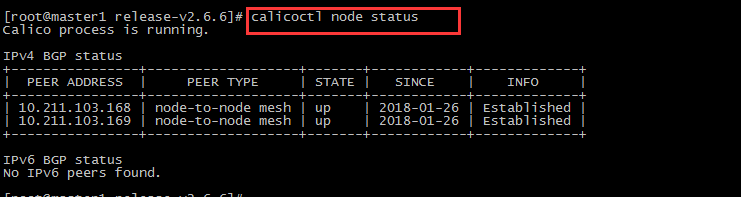

$  vim  ippool.yaml #新建池子
- apiVersion: v1
  kind: ipPool
  metadata:
    cidr: 172.33.0.0/16
  spec:
    ipip:
      enabled: true
      mode: always
    nat-outgoing: true
$  vim  k8s_ns.default.yaml   #修改默认访问策略,否则跨节点依然无法ping通,有默认防火墙策略drop
apiVersion: v1
kind: profile
metadata:
  name: k8s_ns.default
  labels:
    calico/k8s_ns: default
spec:
  ingress:
  - action: allow
  egress:
  - action: allow
$  calicoctl create -f ipPool.yaml
$  calicoctl create -f k8s_ns.default.yaml
四、网络模型的数据对比
目前对比的模型如下,线上用的是万兆网卡的虚拟机,测试方法是不同node节点开启qperf的pod,exec进入pod后容器对容器进行测试,连续测试三次,取结果的平均值。

“运维网咖社”原创作品,允许转载,转载时请务必以超链接形式标明文章 原始出处 、作者信息和本声明。否则将追究法律责任。http://www.net-add.com

 |
社长"矢量比特",曾就职中软、新浪,现任职小米,致力于DevOps运维体系的探索和运维技术的研究实践. |